Not checkedListed 24 September 2026
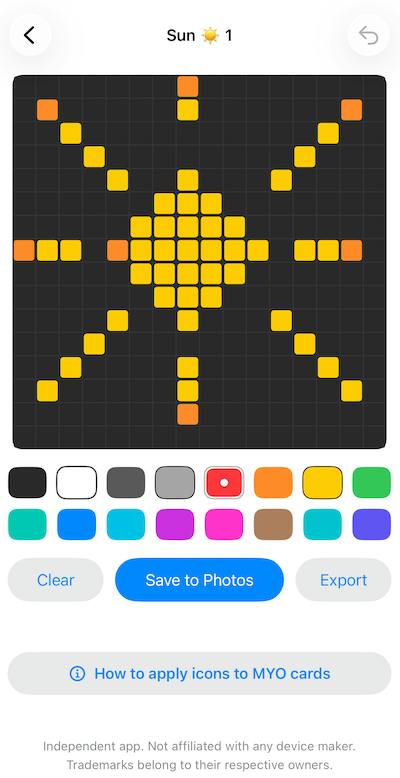
Pixel Draw 16x16
by Simon Pumphrey (opens in a new tab)
Draws 16x16 pixel icons on an iPhone and exports them as PNG files for Yoto Make Your Own card tracks.
Nobody has tested this app yet
It's listed from the maker's public pages. Check the maker's page and what it asks for before you install it.
- Works with
- Yoto Player (3rd gen), Yoto Mini, Earlier players (from the maker's page)
- Needs
- An iPhone on iOS 18.6 or later, or a Mac on macOS 15.6 or later with an Apple M1 chip or later. No login, account or internet connection (from the maker's page)
- Sends data to
- Nowhere. The maker states the app does not collect, store, transmit or share any personal data and works entirely offline (from the maker's page)
- AI use
- AINot declared
- Yoto verified
- Not stated
- Price
- Paid
- Category
- Card tools
- Updated
- 24 September 2026
What it does
A simple offline pixel art editor for creating 16x16 PNG images. The maker built it so his children could make custom icons for their MYO cards without a complex art package, aiming for an open app, draw icon, export flow in about 30 seconds.
It offers a 16x16 grid with a simple palette, tap to draw, undo and erase, editing at a large drawing size, and saving to the Photo library. Planned additions include an extended palette, colour pickers, brushes, backup and restore, redo, and pan and zoom.
The maker states it is independent of Yoto, unofficial and not endorsed, and that there is currently no direct integration with Yoto.
How it uses AI
The maker hasn't told us whether this app uses AI. Treat it as unknown.
How to install
- Get it from the maker
Follow "Go to maker's page" (iOS app) and follow the maker's instructions.
Not checked yet
These come from the maker's public pages. A maintainer hasn't tested them.
- Works on Yoto Player (3rd gen), Yoto Mini, Earlier players
- Sends data to: Nowhere. The maker states the app does not collect, store, transmit or share any personal data and works entirely offline
- AI use not declared
Is this your app? Claim this listing
Report a problem with this listing
More like this
AudioBinder
Not checkedby Daniel Baughman
Turns your audio files into chaptered M4B audiobooks with metadata and cover art, and can publish the book straight to a Yoto MYO playlist.
Calendee for Yoto
Not checkedby Jacquelyn Keller
Turns important dates into countdowns kids can hear on their Yoto player, counting down the sleeps until birthdays, holidays and more.